How to Recover a Banned Mobile Legends Account: Step‑by‑Step Guide
Appeal a Mobile Legends ban by checking the ban reason, submitting an in‑game appeal, preparing account details, and contacting Moonton support for recovery.
Getting banned in Mobile Legends: Bang Bang (MLBB) can be frustrating, especially if you’ve invested time and money into your account. Fortunately, there are official ways to appeal and potentially recover your account. Here’s a clear step‑by‑step guide to help you through the process.
1. Check the Ban Reason
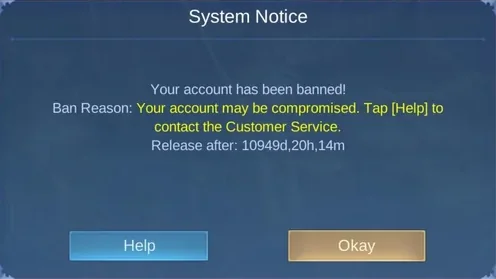
When you attempt to log in, the system will display a message explaining the ban. Common reasons include:
Temporary suspension (1–30 days)
Server‑update glitches (often during migrations)
Permanent bans for violations
Understanding the type of ban is crucial before filing an appeal.
2. Use In‑Game Support
If you can still access the login screen:
Tap the Customer Service / Help icon.
Select Account Retrieval or Ban Appeal.
Fill out the form with accurate details.
3. Prepare Your Details
Moonton requires specific information to verify ownership:
User ID and Server ID
Account creation date
Device models used to play
Screenshots or receipts of diamond top‑ups
Having these ready speeds up the appeal process.
4. Contact Official Support
If you cannot access the game at all:
Visit the Mobile Legends Help Center.
Submit a support ticket with your details.
Alternatively, seek help from community moderators on the official MLBB Discord.
Tips for a Successful Appeal
Be polite and professional in your request.
Provide complete and accurate information.
Avoid multiple submissions; wait for a response.
Final Thoughts
Recovering a banned MLBB account requires patience and proper documentation. By checking the ban reason, using in‑game support, preparing your details, and contacting Moonton directly, you maximize your chances of restoring access.